If your Dyson V15 Detect™ Origin cordless vacuum is pulsing on and off, it can be frustrating and hinder your cleaning. This issue often relates to blockages, filter problems, or overheating, but the good news is that most fixes are simple and safe to perform yourself. Here’s what you need to know to diagnose and resolve the problem efficiently.

Get cleaning gear delivered free — and shop member deals
- Fast, free delivery on millions of items
- Access to Prime Big Deal Days deals on October 6–7
- Prime Video, Amazon Music and more included
Below, you’ll find clear, step-by-step instructions, tips to avoid future issues, and advice on when to seek professional help.
Key Takeaways
| Common Cause | Blockages or clogs in the wand or cleaner head |
| Filter Maintenance | Dirty or clogged filters can cause pulsing |
| Overheating | The vacuum may shut down to prevent damage |
| Battery & Motor | Battery or motor issues can trigger pulsing |
| Regular Checks | Routine cleaning and filter replacement prevent issues |
Step 1: Turn Off and Unplug the Vacuum
Before inspecting or fixing your Dyson, ensure it is turned off and disconnected from any power source. This prevents accidental activation or electrical hazards during troubleshooting.
Step 2: Check for Blockages
- Remove the cleaner head and wand attachments from the vacuum.
- Inspect the entire length of the wand, cleaner head, and hose for obstructions or debris.
- Clear any visible blockages using a long, flexible brush or a straightened wire.
- Reassemble and test the vacuum.
Step 3: Clean or Replace Filters
Dirty filters can cause the vacuum to pulse due to restricted airflow. Remove the pre-filter and main filter as per your user manual.
Wash the filters with cold water and let them air dry completely for at least 24 hours before reinstalling. Consider replacing filters if they are damaged or overly worn.
Step 4: Prevent Overheating
If the vacuum overheats, it may pulse or shut down. Ensure the filters are clean, and the vacuum isn’t used continuously for extended periods. Allow it to cool down for 30 minutes if it feels hot.
Step 5: Check Battery and Motor
If pulsing persists, consider the battery or motor health. Ensure the battery is charged and seated correctly. If the problem continues despite clean filters and clear pathways, contact Dyson support for further diagnosis.
The Products in This Guide

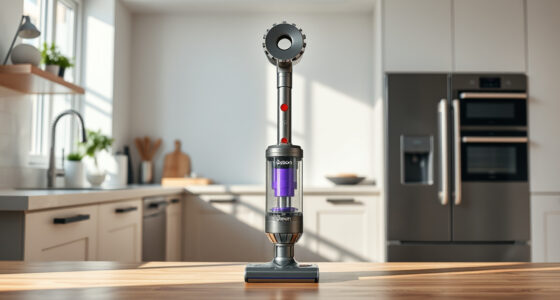
Dyson V15 Detect™ Origin Cordless Vacuum
- ✔ Color: Silver/Blue
- ✔ Weight: 6.8 lbs
- ✔ Run Time: Up to 60 mins

LANMU Crevice Tool Vacuum Attachments Compatible
- ✔ Nozzle Width: Slim profile
- ✔ Material: Plastic
- ✔ Use Case: Corners and tight spaces
Dyson V15 Detect™ Origin Cordless Vacuum
The Dyson V15 Detect™ Origin Cordless Vacuum offers powerful suction and smart technology, making it a top choice for whole-home cleaning. While pulsing can be frustrating, most issues stem from simple causes like blockages or filter problems, which are easy to fix following these steps.
Pros:
- Powerful suction up to 100% more power
- Intelligently adapts to debris
- Long 60-minute runtime
- LCD screen for real-time info
Cons:
- Can overheat if filters are dirty
- Requires regular filter maintenance
- Potential blockage points
Best for: Deep cleaning homes with pet hair and dust
Not ideal for: Light, quick cleanups or minimal maintenance homes
Bottom line: A powerful, intelligent vacuum that benefits from regular maintenance.
LANMU Crevice Tool Vacuum Attachments Compatible
The LANMU Crevice Tool vacuum attachments are compatible with many Dyson models, including the V15. They are ideal for reaching tight corners, between furniture, or in car interiors, helping prevent clogs and blockages that cause pulsing.
Pros:
- Narrow, flexible design
- Easy to attach and use
- Great for detailed cleaning
- Compatible with multiple Dyson models
Cons:
- Only for specific Dyson models
- May need gentle handling
- Limited to crevice cleaning
Best for: Cleaning tight spaces, edges, and car interiors
Not ideal for: Large debris or heavy-duty cleaning
Bottom line: A helpful tool to access hard-to-reach areas and prevent blockages.
Frequently Asked Questions
Why does my Dyson pulsing on and off?
This typically indicates blockages, filter issues, or overheating. Inspect for obstructions, clean or replace filters, and allow the vacuum to cool down if overheated.
How often should I clean or replace the filters?
Wash filters every 1-3 months and replace them every 6-12 months depending on usage. Regular maintenance helps prevent pulsing issues.
Can I fix a pulsing Dyson myself?
Yes, most causes like blockages or dirty filters are simple to fix at home. For persistent issues, contact Dyson support.
Is pulsing related to battery health?
Potentially. If the battery is weak, it might cause inconsistent power. Ensure the battery is fully charged and in good condition.
Keep Your Dyson Performing at Its Best
Regular maintenance, including filter cleaning and checking for blockages, can greatly reduce pulsing issues. If problems persist despite these steps, professional support may be necessary. Proper care will ensure your Dyson V15 Detect™ Origin remains a powerful, reliable cleaning tool for years to come.
Affiliate disclosure: As an Amazon Associate we earn from qualifying purchases. Prices and availability are accurate as of the time of publishing.
Fall Picks
fall essentials
As an affiliate, we earn on qualifying purchases.