
If you’re shopping for the best RGBICWW light bars, the Govee Gaming Light Bars Pro is the strongest all-around pick, thanks to segmented RGBIC color mixing, warm-white LEDs for usable everyday lighting, and reliable app plus voice control. Two alternatives stand out for different budgets: the SwitchBot RGBICWW Light Bars if you want Matter support for Apple Home and a bright 800-lumen output, and the budget WIXBOSHU 2-pack if you just want color effects behind a TV without paying for smart-home polish. The main tradeoff in this category is ecosystem depth versus price: Govee’s app and scene library are the richest but come at a premium, while cheaper generic bars often cut corners on white-light quality and Wi-Fi stability. There’s also a real choice between wall-mounted panels like the Govee Glide and desk-friendly bar designs. Keep reading for the full breakdown of all 13 options and which one fits your setup.

Get cleaning gear delivered free — and shop member deals
- Fast, free delivery on millions of items
- Access to Prime Big Deal Days deals on October 6–7
- Prime Video, Amazon Music and more included
Complete the kit


Key Takeaways
- Govee dominates this category with five of the 13 slots, but its models differ sharply: the Gaming Light Bars Pro and RGBICWW TV lights offer warm-white channels, while the cheaper H6047 skips them entirely.
- Matter support is the clearest dividing line for smart-home buyers — only the SwitchBot and Nurmina Nova bars support it, which matters most if you use Apple Home or want cross-platform reliability without vendor apps.
- Budget 2-pack bars (WIXBOSHU, Smart RGB-IC with Iron Base) deliver fun RGBIC effects but typically lack Wi-Fi and rely on Bluetooth or remote control, which limits scheduling and voice assistant integration.
- The Philips WiZ Gradient Light Bars and Govee Glide wall panels serve a different job than desk bars — they’re built for ambient wall washes behind TVs rather than desk or monitor accent lighting.
- RGBICWW matters more than shoppers expect: the extra warm-white LEDs let these bars double as genuine room lighting, while plain RGBIC models can only produce a cold, tinted white.




| RGBICWW light bar | Connectivity |
|---|---|
| Govee Gaming Light Bars Pro | Wi-Fi |
| WIXBOSHU Smart RGB IC LED Ligh | — |
| Govee Smart Light Bar | — |
| Govee RGBIC Gaming Light Bars | Wi-Fi, Bluetooth |
| SwitchBot RGBICWW LED Light Ba | Matter over Wi-Fi |
| Govee Glide Wall Lights | Bluetooth, Wi-Fi |
| RGB Light Bar Smart Music Sync | Bluetooth |
| Smart RGB-IC Gaming Light Bars | Bluetooth |
| Philips Smart Lighting Gradien | Wi-Fi, Matter |
| Nurmina Nova Light Bars Pro | Matter |
| Govee Smart RGBWIC Light Bars | — |
| Govee Smart Light Bar | Matter, Alexa, Google Home |
| Smart LED Light Bar with Music | — |
More Details on Our Top Picks
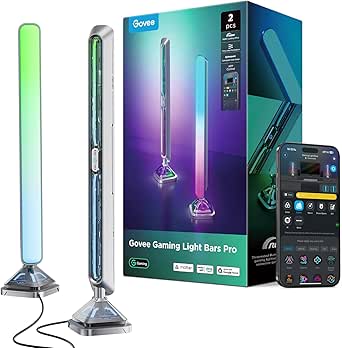
Govee Gaming Light Bars Pro – 16-Inch Smart RGBIC Wi-Fi LED Game Lights
This option stands out as the most immersive pick for PC gamers thanks to its triple-sided illumination, which wraps light around the bar for a 3D effect that flat panels like the SwitchBot RGBICWW bars can’t replicate. Real-time screen sync through Govee Desktop creates color-matched ambience that the Govee H6047 simply can’t offer, since that model ships without any camera or screen-picking capability. Razer Chroma support and AI-generated effects round out a deep feature set. The tradeoff is real: screen sync is Windows-only, and the bars have no built-in color-matching hardware, so Mac users and console-only players lose the headline feature entirely. Compared with the standard Govee Smart Light Bar, this is the more ambitious choice — but only if your setup can actually use it.
Pros:- Triple-sided illumination produces fuller, more immersive 3D lighting
- True real-time screen sync via Govee Desktop for games and movies
- Matter, Alexa, and Google Home support with no hub needed
- AI Lighting Bot 2.0 plus 60+ preset scenes for effortless customization
Cons:- Screen color-matching requires Windows-only desktop software
- No built-in color-matching function on the bars themselves
Best for: PC gamers on Windows who want true screen-synced, Chroma-compatible room lighting
Not ideal for: Mac or console-only users — the flagship screen sync feature won’t work without a Windows PC
- Brand:Govee
- Size:16 inches
- Colors:16M (RGBIC)
- Connectivity:Wi-Fi
- Smart Home:Matter, Alexa, Google Home
- Software:Govee Desktop (Windows only), Govee Home App
- Features:Screen sync, music sync, AI lighting, 60+ scenes
- Compatibility:Razer Chroma
Our verdict“Buy this if you game on Windows and want the deepest screen-sync experience; skip it if you’re not in that ecosystem.”
WIXBOSHU Smart RGB IC LED Light Bars for Gaming, TV Backlight, Room Decor (2-Pack)
Where the Govee Gaming Light Bars Pro leans on software and smart-home depth, the WIXBOSHU pair focuses on the fundamentals done well at a friendlier price. The 213+ light effects dwarf the 60-or-so scenes on most Govee rivals, and having app, remote, and physical control box options means guests and family can adjust lighting without pairing anything — a genuine convenience the SwitchBot bars partially match with their wired controller. The metal base and aluminum alloy build also dissipate heat better than plastic-bodied competitors. The compromises are placement and ecosystem: it’s corded with no Matter or voice-assistant support, and there’s no screen sync at all. This pick makes the most sense for buyers who want vivid, music-reactive bars without paying for smart-home plumbing.
Pros:- 213+ light effects plus DIY customization options
- Three control methods: app, remote, and physical control box
- Durable metal base and aluminum alloy construction for heat dissipation
- Handy timer and scheduling functions
Cons:- Corded power limits where you can place the bars
- No smart-home ecosystem or voice assistant support
Best for: Budget-conscious buyers who want big effect variety and hands-on controls without a smart-home subscription
Not ideal for: Smart-home enthusiasts — no Matter, Alexa, or Google Home integration here
- Brand:WIXBOSHU
- Length:17.3 inches
- Colors:16 million+ (RGB+IC)
- Light Effects:213+
- Control Methods:Smart App, Remote Control, Control Box
- Music Sync:Yes (built-in microphone)
- Material:Aluminum alloy back, ABS front, metal base and pole
- Quantity:2 light bars
- Warranty:2 years
Our verdict“A sensible value choice for effect variety and build quality, provided you don’t need voice control or screen sync.”
Govee Smart Light Bar, RGBICWW TV Lights for Living Room, Gaming, Black
This is the pick I’d point most people toward, because it nails the RGBICWW formula this roundup is about: multi-color RGBIC effects plus tunable warm-to-cool white that pure RGBIC models like the Govee H6047 lack entirely. That tunable white matters more than it sounds — it makes these bars genuinely useful for everyday reading and TV ambience, not just gaming flash. Flexible placement (flat, vertical, or wall-mounted with included brackets) and a generous 106-inch cord give it installation freedom the corded WIXBOSHU pair can’t match, and Matter support keeps it future-proof. The tradeoffs are modest but real: it’s specced for monitors under 45 inches, and getting past the basics means living in the Govee Home App. Compared with the Gaming Light Bars Pro, it trades screen sync for versatility — the right swap for most living rooms.
Pros:- True RGBICWW with tunable cool-to-warm white alongside vivid multi-color effects
- Lay flat, stand vertically, or wall-mount with included brackets
- Matter support with Alexa and Google Home voice control, no hub required
- Long 106-inch cord gives flexible placement
Cons:- Recommended only for monitors and TVs under 45 inches
- Advanced customization depends entirely on the Govee Home App
Best for: Living-room viewers and casual gamers who want one bar that handles both colorful scenes and practical white light
Not ideal for: Owners of large 55-inch-plus TVs — these bars are recommended only for screens under 45 inches
- Technology:RGBICWW
- Recommended Monitor Size:Under 45 inches
- Cord Length:106 inches
- Smart Home Compatibility:Matter, Alexa, Google Home
- App:Govee Home App
- Scene Modes:60+
- Placement Options:Lay flat, stand vertically, or wall-mount with brackets
Our verdict“The most balanced RGBICWW choice for mixed living-room and gaming use — buy it if you want one set that does everything adequately.”
Govee RGBIC Gaming Light Bars H6047 with Smart Controller, Wi-Fi Smart LED
What separates the H6047 is the desktop dial controller — a physical, tactile way to shift colors and effects mid-match that no other bar in this lineup offers. Compared with the Govee Gaming Light Bars Pro, this model is the simpler sibling: same multi-zone RGBIC color and Razer Chroma sync, but no camera and no screen color picking, which is the single biggest capability gap here. Audio reactivity from speakers or headphones still delivers plenty of game-night atmosphere, and the dial means you’ll rarely fumble for your phone. The software burden is the other cost: full functionality demands juggling Govee Home, Govee Desktop, and Razer Synapse 3. This pick makes the most sense for gamers who value instant physical control over screen-matched accuracy.
Pros:- RGBIC multi-zone lighting displays several colors at once
- Unique desktop dial controller for instant adjustments
- Syncs with Razer Chroma and reacts to audio from speakers or headphones
- AI Lighting Bot 2.0 generates custom effects from voice, text, or photos
Cons:- No camera, so screen color picking is not supported
- Requires multiple apps (Govee Home, Govee Desktop, Razer Synapse 3) for full functionality
Best for: Gamers who want instant, physical control over lighting without reaching for a phone mid-session
Not ideal for: Movie watchers wanting TV color-matching — no camera means screen color picking is off the table
- Model:H6047
- Connectivity:Wi-Fi, Bluetooth
- Technology:RGBIC
- Color Options:16.8 million colors
- Scene Modes:60+
- Compatibility:Razer Synapse 3, Alexa, Google Assistant
- Controller:Smart desktop dial controller
- Camera:None (no screen color picking)
Our verdict“Choose this for tactile, dial-driven control and Razer integration; look elsewhere if screen-matched color is your priority.”
SwitchBot RGBICWW LED Light Bars, Smart TV Backlight with Matter, 800lm
For buyers whose homes already run on Apple Home or SmartThings, this is the clear pick — its native Matter-over-Wi-Fi support covers four ecosystems with no hub, while most Govee rivals skew toward Alexa and Google. The 2200–6500K tunable white with 1–100% dimming makes it a genuinely practical light source, not just decoration, and up to 800 lumens outperforms typical ambience bars in this group. Magnetic, adhesive, or freestanding mounting gives it placement flexibility the Govee RGBICWW TV Lights match with brackets but the corded WIXBOSHU doesn’t. The open API is a niche bonus for tinkerers linking AI agents to light cues. Tradeoffs: only 26 effects versus 200+ on the WIXBOSHU, magnetic mounting needs metal surfaces, and it’s still tethered to an outlet.
Pros:- Native Matter support across Apple Home, Alexa, Google Home, and SmartThings with no hub
- Bright output up to 800 lumens with 1–100% dimming and 2200–6500K tunable white
- Versatile magnetic, adhesive, or freestanding mounting
- Open API enables custom AI-agent lighting cues for advanced users
Cons:- Corded power limits placement flexibility
- Only 26 lighting effects, far fewer than competing bars
- Magnetic mounting only works on compatible metal surfaces
Best for: Apple Home, SmartThings, or multi-ecosystem households wanting bright, dimmable, hub-free smart lighting
Not ideal for: Effect collectors — 26 presets is modest next to bars offering 200-plus scenes
- Brand:SwitchBot
- Model:W1070
- Brightness:Up to 800 lm (pair)
- Color Temperature:2200–6500K
- Colors:16 million, RGBICWW
- Zones:6 RGBIC zones per bar
- Connectivity:Matter over Wi-Fi
- Compatible Ecosystems:Apple Home, Alexa, Google Home, SmartThings
- Mounting:Magnetic, adhesive, tabletop
Our verdict“The smart-home-first choice — pick it for ecosystem breadth and usable white light, not for effect variety.”
Govee Glide Wall Lights, Smart RGBIC Gaming Light Bar (2-Panel Set)
This option stands out for turning an entire wall into a lighting canvas rather than just accenting a desk. With RGBIC technology showing up to 24 colors at once across six illuminated segments, the Glide produces layered gradient effects that the smaller tabletop RGB Light Bar by velted simply cannot match with its eight basic color modes. Integration runs deep: Alexa, Google Assistant, and SmartThings all work, plus an AI Lighting Bot that generates custom effects on request — a feature set closer to the Philips WiZ Gradient bars but with far more scene variety (64+ presets versus a handful). The tradeoff is format. These are rigid panels, not flexible strips, so they demand smooth wall space, and the adhesive needs about an hour to set before the bars stay put reliably.
Pros:- RGBIC displays up to 24 colors simultaneously across segments for dramatic gradients
- Broad ecosystem support including Alexa, Google Assistant, SmartThings, and an AI Lighting Bot
- 64+ scene modes and 11 music sync modes offer deep customization
- Tool-free installation on smooth surfaces with included velcro and adhesives
Cons:- Rigid construction means the bars cannot be bent, curved, or reshaped
- Adhesive requires roughly an hour to cure before mounting is dependable
- All bars must be connected before powering on, which complicates layout changes
Best for: Renters and gamers who want bold wall-scale gradient lighting behind a battlestation without drilling holes
Not ideal for: Anyone wanting flexible, bendable placement or a simple plug-and-play desk lamp — the rigid panels and mounting requirements limit repositioning
- Model:H610A
- Panel Count:2 panels, 3 light sections each
- Segment Length:14.8 inches per section
- Color Technology:RGBIC, up to 24 simultaneous colors
- Connectivity:Bluetooth, Wi-Fi
- Compatibility:Alexa, Google Assistant, SmartThings
- Music Modes:11
- Scene Modes:64+
Our verdict“Buy this if you want the most visually dramatic wall-mounted gradient in the lineup and are willing to live with a fixed, rigid layout.”
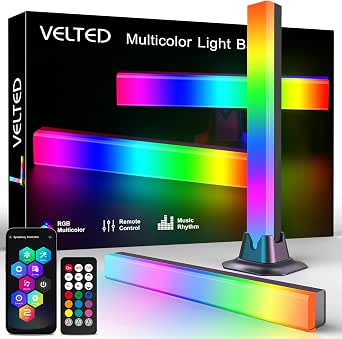
RGB Light Bar Smart Music Sync IC LED Light Bars with APP & Remote Control
For a first dip into RGBIC-style lighting, this velted DX21005-1 pair makes the most sense for the money. It skips Wi-Fi entirely — control happens through Bluetooth app or the included remote — which means no router setup, no accounts, and no smart home ecosystem required. Compare that to the Nurmina Nova Pro, which leans heavily on Matter and app layers; here you plug into any USB port and it works immediately. The compromises are real, though. Music sync is limited to seven modes and eight color effects, a fraction of the Govee Glide’s 11 music modes and 64+ scenes, and there is no adjustable white tone, so it falls short of the true RGBICWW experience the roundup is built around.
Pros:- True plug-and-play operation straight out of the box
- Dual control via Surplife app and physical remote without needing Wi-Fi
- USB power works with PCs, TVs, and consoles anywhere
- Removable base adds placement flexibility on desks and shelves
Cons:- Limited effect library with only seven music modes and eight color modes
- No adjustable white tones, missing the WW half of the RGBICWW equation
- Indoor-only build with no water resistance at all
Best for: Students and casual users who want instant plug-and-play color lighting from a laptop or TV USB port
Not ideal for: Smart home builders and RGBICWW purists — no white color temperature control, no voice assistants, and effects are basic compared to app-driven rivals
- Model:DX21005-1
- Power Source:USB 5V
- Wattage:5 watts
- Control:Surplife app, remote control
- Connectivity:Bluetooth
- Color Modes:8 dynamic, 7 music sync
- Mounting:Tabletop with removable base
- Warranty:1 year
Our verdict“This is the low-commitment entry point for USB-desk lighting — just don’t expect the depth of an ecosystem product.”
Smart RGB-IC Gaming Light Bars with Iron Base (2-Pack)
Where the Govee Glide wants your wall, this 2-pack wants the few inches directly behind your monitor. The RGB-ICW technology finally adds adjustable white tones to the multi-color effects, which the cheaper velted bars lack — that means usable warm white for evening work sessions alongside the RGB party modes. A built-in microphone handles music sync without taxing your phone, unlike the Philips WiZ bars, which rely on the smartphone mic for the same trick. The iron plate base feels sturdier than typical plastic stands and slides neatly into tight desk gaps. Be aware that full customization lives entirely in the Bluetooth app, and USB power tethers you to a nearby port or hub, so free-standing shelf placement gets awkward.
Pros:- RGB-ICW adds adjustable white tones to multi-color effects
- Built-in high-sensitivity mic drives music sync without phone involvement
- Weighted iron base sits stably in cramped desk spaces
- Compact footprint disappears behind monitors without clutter
Cons:- Full feature access requires the smartphone app, with no voice assistant support
- USB power dependency limits where the bars can physically sit
- No Wi-Fi means no smart home or away-from-home control
Best for: PC gamers and work-from-home users who want subtle bias lighting plus adjustable white behind a monitor
Not ideal for: Living room TV setups — USB power and short cables make placement behind a wall-mounted TV impractical
- Technology:RGB-ICW
- Quantity:2-pack
- Base:Iron plate
- Power:USB
- Connectivity:Bluetooth
- Music Sync:Built-in microphone
Our verdict“The right pick if your lighting goal is a clean, low-profile monitor backdrop with white tone flexibility rather than a whole-room statement.”
Philips Smart Lighting Gradient Light Bars (Connected by WiZ) – RGBIC LED, Multicolor Effects, Sync with TV and Music
This is the pick for buyers who already live in a smart home. Matter compatibility out of the box means these WiZ-connected bars plug into Alexa, Google Home, and Apple Home natively — a cleaner proposition than the Govee Glide’s proprietary app-first approach, and on par with the Nurmina Nova Pro but backed by Signify’s established WiZ platform. The horizontal or vertical placement options, including wall brackets, give layout flexibility the desk-bound iron-base 2-pack can’t offer, and gradient effects span both bars smoothly. Two caveats shape the buying decision: it is not compatible with Philips Hue, a common and costly assumption, and genuine TV screen-matching requires separately purchased hardware — the music sync here is microphone-based, not content-aware.
Pros:- Matter support across Alexa, Google Home, and Apple Home with no hub required
- Flexible placement: horizontal, vertical, or wall-mounted behind a TV
- Smooth two-bar RGBIC gradients for polished ambient effects
- Backed by a 2-year Signify manufacturer warranty
Cons:- Incompatible with the Philips Hue ecosystem despite shared branding
- True TV screen syncing needs additional hardware sold separately
- All-plastic construction feels less premium than the price suggests
Best for: Apple Home or multi-assistant smart home households wanting Matter-native gradient lighting without a bridge
Not ideal for: Existing Philips Hue owners expecting compatibility, and anyone wanting true on-screen TV sync without buying extra hardware
- Model:612465
- Light Bars:2
- Wattage:8.4 watts
- Connectivity:Wi-Fi, Matter
- Compatibility:Alexa, Google Home, Apple Home
- Mounting:Tabletop or wall brackets
- Warranty:2 years
Our verdict“Choose this if Matter-native multi-assistant control matters more to you than deep effect libraries or Hue integration.”
Nurmina Nova Light Bars Pro – Smart RGBWIC Gaming Lights with Matter, AI Effects & Music Sync
The Nova Pro earns its slot by packing premium features into a 16-inch footprint. Its RGBWIC technology enables segment-level color control, and the AI modes — Photo Gen, Voice Gen, Random Gen — generate bespoke scenes from a picture or a spoken prompt, going beyond the Govee Glide’s AI Bot with more creative inputs. With 800 lumens of output, it outshines the 8.4-watt Philips WiZ bars while still covering the white spectrum from a warm 3000K base. Control options are the widest here: app, physical remote, and touch. Two honest limits: 800 lumens is ambient territory, not task lighting, so it won’t replace a desk lamp, and the IP20 rating means no outdoor or bathroom use despite marketing suggestions otherwise.
Pros:- AI effect generation via photo, voice, or random modes creates scenes no preset library offers
- Matter support across Alexa, Google Assistant, and Apple Home without extra hubs
- Triple control options: app, remote, and touch
- Aluminum and polycarbonate build feels more substantial than all-plastic rivals
Cons:- 800 lumens limits it to accent lighting, not primary illumination
- IP20 rating rules out outdoor or humid environments
- Premium feature set commands a higher spend than simpler USB options like the velted pair
Best for: Enthusiasts who want AI-generated custom scenes, Matter integration, and the most control methods in a single premium purchase
Not ideal for: Buyers needing bright functional lighting or any moisture resistance — 800 lumens and an IP20 rating keep this strictly to dry, ambiance-oriented spaces
- Technology:RGBWIC, segment-level control
- Brightness:800 lumens
- Color Temperature:3000K base
- Wattage:15 watts
- Height:16 inches
- Connectivity:Matter
- Control:App, remote, touch
- Build:ABS plastic, aluminum, polycarbonate
Our verdict“Spend up for this if AI-driven customization and full smart home integration are priorities; skip it if you just need bright, simple bias lighting.”
Govee Smart RGBWIC Light Bars, 15-Inch WiFi TV Backlight for 45-70-Inch TVs
Most light bars in this roundup quietly assume you’re lighting a desk monitor, and the Govee RGBWIC Light Bars are the exception that doesn’t. Sized for 45-70 inch TVs, the 15-inch bars carry 27 extra LEDs per bar, which matters when the light has to wash across a wall behind a big screen rather than a desk. Compared with the Govee Smart Light Bar in Silver, which tops out at monitors under 45 inches, this is the clear pick for living room setups. Matter support across Alexa, Google Home, and SmartThings without a hub keeps it future-proof, and AI-generated effects add novelty. The real gap: unlike the Philips WiZ Gradient Light Bars, there’s no on-screen color matching — the bars react to music and app scenes, not TV content. Corded power also means planning outlet placement.
Pros:- Upgraded RGBWIC delivers richer colors and purer whites than standard RGB bars
- Works with Matter, Alexa, Google Home, and SmartThings without a hub
- Multiple placement options: wall-mount, standing, or horizontal
- Music sync plus 60+ scene modes and AI-generated effects
Cons:- No color-matching function — does not sync to on-screen TV content
- Corded electric power requires outlet access near the TV
Best for: Living room owners with 45-70 inch TVs who want rich ambient backlighting and whole-home smart ecosystem support
Not ideal for: Buyers who want lights that sync to what’s actually on screen — this is music and scene sync only
- Light Source Type:LED
- Light Sources:30
- Power Source:Corded Electric (12V)
- Wattage:10 watts
- Mounting Type:Wall Mount
- Compatibility:Matter, Alexa, Google Assistant, SmartThings
- Certification:UL Listed
- Weight:2 pounds
Our verdict“The pick for large-screen living rooms, provided you want ambient ambiance rather than true screen-sync lighting.”
Govee Smart Light Bar, RGBICWW TV Lights for Living Room and Gaming, Silver
This is the bar that best embodies the roundup’s theme, because true RGBICWW means tunable cool-to-warm white alongside segmented RGBIC color — something the ECWEYAG bar can’t match if you ever want soft, candle-toned lighting instead of neon gaming colors. The Silver finish also reads more furniture-like than the plastic look of most competitors, which suits a living room shelf more than a battle station. With a 106-inch cord, placement flexibility beats the shorter-tethered options here. Compared with the Govee RGBWIC bars for large TVs, this one targets the opposite buyer: it’s recommended for monitors under 45 inches, so it’s a desk-and-small-TV solution. The tradeoff is ecosystem depth — every meaningful feature lives inside the Govee Home app, and skipping app setup leaves you with a fairly basic light.
Pros:- Genuine RGBICWW with tunable warm-to-cool white, not just RGB color
- Matter-compatible voice control with no hub required
- Generous 106-inch cord for flexible placement
- Lay flat, stand vertically, or wall-mount with included brackets
Cons:- Recommended only for screens under 45 inches
- Full feature set depends entirely on the Govee Home app
Best for: Design-conscious buyers setting up a desk or small TV space who want warm-to-cool white lighting as well as color effects
Not ideal for: Owners of 55-inch-plus TVs — the light output and coverage are tuned for screens under 45 inches
- Technology:RGBICWW
- Color:Silver
- Connectivity:Matter, Alexa, Google Home
- Music Sync:Yes (built-in microphone)
- Scene Modes:60+
- Recommended Screen Size:Under 45 inches
- Cord Length:106 inches
- Hub Required:No
Our verdict“The most balanced RGBICWW pick here for small-screen spaces — just don’t expect it to carry a big living room.”
Smart LED Light Bar with Music Sync, RGBICWW TV Backlight for Gaming and Room Decor
For a first dip into ambient lighting, the ECWEYAG light bar pair covers the basics at a fraction of the complexity of premium options. USB power at 5 watts means these plug into your TV’s port or any adapter — no outlet gymnastics like the Govee RGBWIC bars demand. The included physical button box is a surprisingly practical touch; family members who won’t touch an app can still change modes, something neither Govee pick offers. Where it falls short of the Govee Silver RGBICWW bar: whites are less refined, effects live in the third-party Tuya/Smart Life ecosystem rather than Govee’s polished app, and there’s no Matter support. Still, with 40 IC beams and 3 music sync modes, the effect-to-simplicity ratio is strong for casual gaming corners and dorm rooms.
Pros:- USB-powered setup works straight from a TV port or adapter
- Physical button box control for households that avoid apps
- 16 million colors with 40 IC beams and 3 music sync modes
- Removable bases allow standing, wall-mounting, or horizontal placement
Cons:- Relies on the third-party Tuya/Smart Life app rather than a mature first-party app
- No Matter support and whites lack the RGBICWW tuning of pricier rivals
- Not water resistant — strictly indoor use
Best for: First-time buyers, students, and casual gamers who want easy USB-powered color lighting without a big investment
Not ideal for: Smart-home enthusiasts — no Matter support and the Tuya app ecosystem is less refined than Govee’s
- Brand:ECWEYAG
- Light Sources:40
- Power Source:USB (5V)
- Wattage:5 watts
- Colors:16 million (multicolor)
- Control Methods:Tuya/Smart Life app, button box, Alexa, Google Assistant
- Mounting Type:Floor Mount / Wall Mount
- Warranty:12 months
Our verdict“A sensible entry point for low-commitment color lighting, as long as smart-home polish isn’t a priority.”
How We Picked
I ranked these light bars around four factors that actually change the day-to-day experience. First, color architecture: true RGBICWW bars with dedicated warm-white LEDs scored higher than RGBIC-only models, because a proper white channel determines whether a bar can double as real room lighting. Second, smart-home integration — Wi-Fi connectivity, Matter support, and compatibility with Alexa, Google Home, and Apple Home separated the serious options from remote-control-only kits. Third, mounting flexibility and brightness, since a bar suited for a 65-inch TV wall needs different output and placement options than a desk pair next to a monitor.
Fourth, I weighed ecosystem and app quality, which is where Govee’s scene libraries, music sync, and Dreamview-style features justify its premium pricing, and where budget brands typically fall short. Products are ordered from the most complete packages at the top toward narrower, budget, or more specialized options at the bottom. No bar earns its spot on effects alone — a model had to justify who it’s for and what it asks you to give up.
Factors to Consider When Choosing Best RGBICWW Light Bars
Before picking a specific model, it helps to understand what actually separates a satisfying RGBICWW light bar from one that ends up unplugged in a drawer. These are the factors that shaped the rankings above — and the mistakes I see buyers make most often.
RGBIC vs. RGBICWW: Why the Second W Matters
The letters aren’t just marketing shorthand. RGBIC means the bar divides into independently controlled segments, so it can show multiple colors at once along its length. RGBICWW adds dedicated warm-white LEDs, and that difference decides whether the bar can produce a pleasant, candle-tinged white for everyday use or only a harsh blue-tinted approximation mixed from RGB chips. Buyers frequently order RGBIC-only kits to use as reading or ambient room lighting and end up disappointed by the color temperature. If you plan to use your bars for anything beyond colorful gaming effects, insist on the WW suffix — and check listings carefully, because some products use the terms loosely. A bar that can’t hit a believable 2700K warm white will always feel like a novelty rather than a lamp.
Connectivity: Wi-Fi, Bluetooth, and Matter
Connectivity determines what your bars can actually do when you’re not standing next to them. Bluetooth-only models are cheaper but lock you into a phone app within range — no away-from-home control, no voice assistants, no routines that run while your phone is off. Wi-Fi models unlock Alexa and Google Home, scheduling, and geofencing, which is why they dominate the top of this list. Matter support, found on the SwitchBot and Nurmina picks, is the newest wrinkle: it lets the bars join Apple Home natively and keeps working locally even if the manufacturer’s cloud disappears. The mistake to avoid is assuming all “smart” bars are equally smart — a remote-controlled kit with a Bluetooth app is a fundamentally different product from a Wi-Fi bar tied into your home ecosystem.
Placement: Desk Bars vs. TV Backlights vs. Wall Panels
Light bars fall into three physical categories, and buying the wrong one is the most common mismatch in this space. Desk bar pairs sit on bases beside a monitor and throw color onto the wall behind your setup — the classic gaming look. TV backlights mount behind a television, where higher brightness and wider coverage matter more than precision segments. Wall panels like the Govee Glide become a design element themselves, mounted visibly rather than hidden. Before ordering, measure where the bars will sit and check the TV size range the manufacturer specifies — a bar designed for 45-to-70-inch screens will look undersized behind an 85-inch display. Also confirm what’s in the box: some kits include adhesive and mounting brackets, others expect you to supply them.
Music Sync and TV Sync Quality
Every bar on this list claims music sync, but the implementations vary enormously. App-based sync uses your phone’s microphone, which works fine for parties but reacts late and poorly in noisy rooms. Built-in microphones on the bar itself respond faster and more accurately to bass. True TV color sync — where on-screen colors bleed onto the wall behind the TV — is a different technology entirely, usually requiring a camera mounted on the set or an HDMI pass-through box, and many budget bars simply don’t support it. If screen sync is your main reason for buying, verify the specific mechanism before purchasing rather than trusting “sync with TV” on the box. Generic brands tend to exaggerate this feature the most.
Brightness, Lumens, and Room Size
Brightness specs are where comparisons get tricky, because many brands advertise LED counts or segment numbers instead of lumens. As a rough guide, a desk pair around 300–500 total lumens creates a satisfying accent glow, while a TV wall wash in a large living room benefits from 800 lumens or more — which is why the SwitchBot’s output is a genuine advantage. Dimmer bars aren’t worse, they’re just meant for smaller spaces; a 200-lumen pair will disappear in a bright family room but look great in a bedroom or dorm. Also check whether brightness adjusts smoothly or in coarse steps, since you’ll want a low nighttime setting that doesn’t flicker. And remember that colored light reads dimmer than white at the same lumen rating, so budget extra output if color effects are the priority.
Ecosystem Lock-In and Long-Term Support
Cheap bars from unknown brands carry a hidden cost: their apps are often ad-supported, rarely updated, and prone to breaking when a phone OS changes. Established ecosystems like Govee, SwitchBot, and Philips WiZ have track records of firmware updates, growing scene libraries, and working integrations years after purchase. That reliability is a real reason to pay more, not brand snobbery. Matter-certified devices offer the strongest long-term hedge, since the standard works across platforms and doesn’t depend on one company’s cloud servers staying online. If you already own smart bulbs or plugs from a particular brand, staying within that ecosystem also means one app and one setup flow instead of three. The cheapest option on paper is rarely the cheapest over a three-year ownership period.
Frequently Asked Questions
Can RGBICWW light bars produce a decent white light for reading or everyday use?
Yes, but only the models with genuine warm-white LEDs, which is exactly what the second W in RGBICWW signifies. Bars like the Govee RGBICWW TV lights and SwitchBot’s 800lm bars can output a tunable white that works as real ambient lighting, not just a novelty glow. Plain RGBIC models mix red, green, and blue to fake white, which always leans cold or tinted and gets fatiguing quickly. If reading or general room lighting is part of your plan, treat the warm-white channel as non-negotiable and read listings carefully, since some brands blur the terminology. If you only want colorful effects for gaming sessions, an RGBIC-only bar saves money without real loss.
Is Matter support worth paying extra for on a light bar?
It depends on your smart home, but for Apple Home users it’s close to mandatory — many Wi-Fi light bars only integrate with Alexa and Google, leaving iPhone households stuck with the manufacturer’s app. Matter also means the bar connects locally rather than through a company’s cloud, so it keeps working even if that brand shuts down its servers, a fate that has already befallen several budget smart-lighting apps. The SwitchBot bars and Nurmina Nova are the Matter standouts in this lineup. If you’re ecosystem-free and happy controlling lights from one app, Matter is a nice-to-have rather than a need. But if you automate with Siri, routines, or a platform like Home Assistant, it removes your biggest compatibility headache.
Do cheap generic light bars actually sync with TV content?
Usually not in the way the listings imply. True screen sync requires either a camera that watches your TV or an HDMI box that reads the video signal, and most budget bars offer neither — their “TV sync” means music-reactive modes driven by a microphone picking up sound from the room. That can still look lively during movies and games, but it won’t match on-screen colors. Govee’s ecosystem offers genuine screen-mirroring through its camera and HDMI accessories, which is a real differentiator if wall-matching color is the goal. Before buying any bar for TV sync, check exactly how the sync works rather than trusting the marketing phrase. If precise color matching matters, expect to buy into an ecosystem with the right hardware.
Should I get a desk pair or a single wall panel setup?
A desk pair flanking your monitor creates depth behind your setup and works beautifully at close range, making it the right call for gaming stations and home offices. Wall panels like the Govee Glide serve the opposite role: they’re visible design objects that wash an entire wall with segmented color, better suited to living rooms and media walls than desks. A single TV backlight bar behind the screen is a third option that reduces eye strain during dark-room viewing by softening the contrast between a bright screen and dark wall. The mistake is buying wall panels for a desk or desk pairs for a big media wall — both work technically but look out of scale. Match the form factor to the room, not the photos on the product page.
How many Govee models are there here, and which one should I pick?
Govee appears five times in this lineup because it genuinely dominates the category, but the models aren’t interchangeable. The Gaming Light Bars Pro is the most complete package for desk setups with its responsive effects and polished app. The RGBICWW TV lights (in black or silver — same product, different finish) target living rooms with proper warm-white output. The H6047 is the value entry with a physical smart controller but skips the warm-white channel. The Glide wall panels are a different product type entirely, built for wall mounting rather than desks. Pick by placement and white-light needs rather than by brand loyalty — the differences between Govee’s own models are larger than the gaps between some competing brands.
Conclusion
After comparing all 13 options, the right choice comes down to what you’re lighting and how smart you need it to be. For best overall, the Govee Gaming Light Bars Pro delivers the category’s most complete package: segmented RGBIC effects, warm-white output, polished app control, and reliable voice assistant integration. The SwitchBot RGBICWW bars are the smart-home pick, pairing 800-lumen brightness with Matter support that Apple Home users shouldn’t skip.
For best value, the WIXBOSHU 2-pack covers a TV wall with color effects at a fraction of the premium price, provided you can live without Wi-Fi and voice control. Beginners should start with the Govee H6047 — its physical smart controller means you can change effects without learning an app, and it’s an easy on-ramp to Govee’s ecosystem. For a premium statement piece, the Philips WiZ Gradient Light Bars or Govee Glide wall panels justify their cost through build quality and design presence rather than raw specs.
Specific needs narrow it further: the Govee RGBICWW TV lights for 45–70-inch living room setups, the Nurmina Nova for Matter-and-AI-driven automation enthusiasts, and the budget Smart RGB-IC bars with iron base for kids’ rooms or dorms where a knock-over-proof stand matters more than an app. Whatever you choose, prioritize the warm-white channel if these bars will do double duty as real lighting — that single feature separates the satisfying picks from the shelf dwellers.
Fall Picks
fall essentials
As an affiliate, we earn on qualifying purchases.