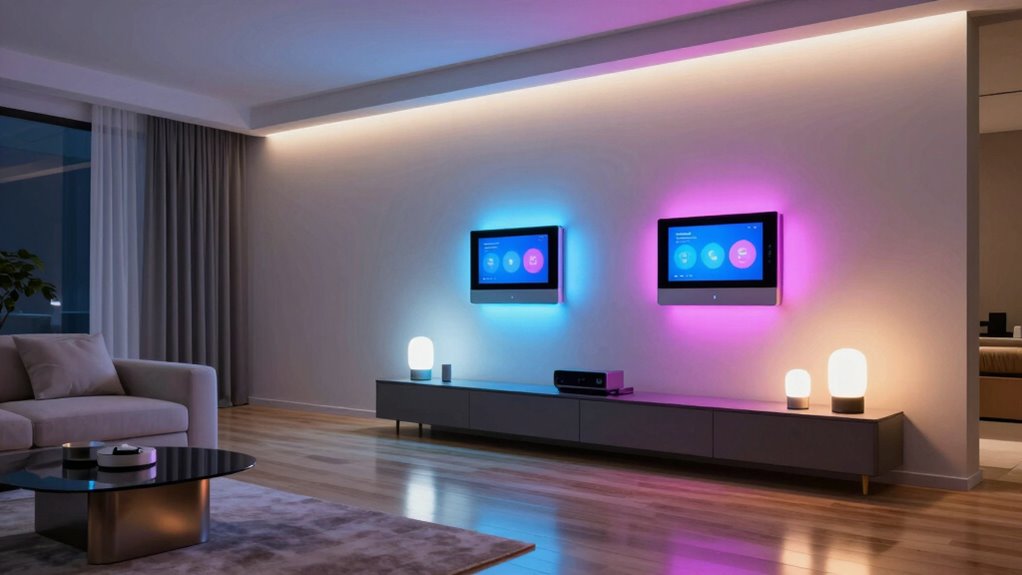

For whole-home lighting scenes, I recommend the Lutron Caseta Diva Smart Dimmer Starter Kit as the best overall pick for dependable control of installed dimmers and convenient physical scene changes. The Philips Hue Bridge Pro Starter Kit stands out for color-rich scenes across Hue bulbs, while the Aeotec Smart Home Hub suits homes combining devices from several smart-home protocols. The main tradeoff is focus versus flexibility: lighting-specific hubs can be simpler and more predictable, while broader hubs can link more devices but may take extra setup. I compare the 15 options by scene control, compatibility, usability, and room to grow so you can choose a hub that fits your home.

Get cleaning gear delivered free with Prime
- Fast, free delivery on millions of items
- Prime Video, Amazon Music and more included
- Member-only deals all year
Complete the kit


Key Takeaways
- Lutron Caseta kits lead for scenes built around installed dimmers. The Diva kit adds a wall dimmer and Pico remote, while the Caseta bridges are better fits when the priority is connecting compatible Lutron controls to a wider smart-home setup.
- Hue is the clearest route to coordinated color scenes. The Hue Bridge and Bridge Pro products are dedicated lighting choices, while the starter kits add bulbs and controls for buyers building a Hue system from scratch.
- Multi-protocol hubs trade simplicity for breadth. Aeotec, Aqara M3, Hubitat, and Home Assistant Green can serve wider device ecosystems, but their setup and automation demands differ from lighting-focused hubs.
- Starter kits and standalone hubs solve different problems. Kits from Lutron and Philips Hue bundle lighting hardware, while standalone hubs make more sense when compatible lights or controls are already in place.
- Whole-home scenes depend on system fit, not protocol count alone. A hub must work with the devices, platforms, and control habits already in the home; extra compatibility has little value if it complicates everyday scene use.
| Lutron Caseta Diva Smart Dimmer Starter Kit with Hub, Pico Remote, and Pedestal | 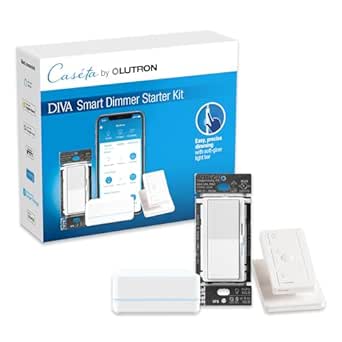 | Best for Whole-Home Wall-Dimmer Scenes | Model: DVRF-BDG-1DP-A | Included: Diva smart dimmer, Lutron Smart Hub, Pico remote, Pico pedestal | Control methods: App, remote, voice | VIEW ON AMAZON | See Our Full Breakdown |
| Lutron Caseta Pro Wireless Smart Bridge Home Lighting Kit |  | Best Caséta Starter Kit for Pro Integration | Smart bridge model: L-BDGPRO2-WH | In-wall dimmer model: PD-6WCL-WH | Pico remote model: PJ2-3BRL-WH-L01R | VIEW ON AMAZON | See Our Full Breakdown |
| Aqara Smart Home Hub M3 Matter Controller |  | Best for Mixed-Protocol Local Automations | Model: HM-G01E | Protocols: Zigbee, Thread, Matter, Bluetooth, Wi-Fi | Device capacity: Up to 127 Aqara Zigbee devices and 127 Thread devices | VIEW ON AMAZON | See Our Full Breakdown |
| Lutron Caséta Smart Hub, Compatible with Alexa, Apple HomeKit, Google Assistant, and More | 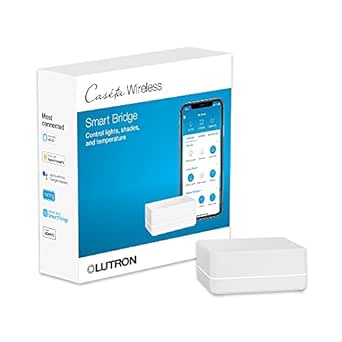 | Best Hub for Scaling a Caséta Lighting System | Model: L-BDG2-WH | Connectivity: Connects to router; Clear Connect wireless technology | Maximum supported devices: 75 Caséta devices | VIEW ON AMAZON | See Our Full Breakdown |
| Philips Hue White and Color Ambiance Smart Light Starter Kit with Bridge, Dimmer Switch, and Two A19 Bulbs |  | Best for Color-Rich Room Scenes | Bulb type: A19 LED | Bulb base: E26 | Bulbs included: 2 | VIEW ON AMAZON | See Our Full Breakdown |
| Aeotec Smart Home Hub with SmartThings, Z-Wave, Zigbee, and Matter |  | Best for Mixed-Brand Whole-Home Scenes | Model: V3 Smart Home Hub (2020) | Connectivity: Ethernet, Wi-Fi, Z-Wave, Zigbee, Matter | Z-Wave frequency: 908.42 MHz | VIEW ON AMAZON | See Our Full Breakdown |
| Legrand Radiant with Netatmo Surface-Mount Smart Gateway, White |  | Best for Legrand Wall-Control Scenes | Model: WNRH2WH | Mounting type: Wall mount | Connectivity: Wi-Fi | VIEW ON AMAZON | See Our Full Breakdown |
| Philips Hue Bridge Smart Lighting Hub |  | Best Dedicated Hue Scene Hub | Model: 453761 | Connectivity: Zigbee, Ethernet | Capacity: Up to 50 lights and accessories | VIEW ON AMAZON | See Our Full Breakdown |
| Philips Hue Bridge Pro Starter Kit with 4 A19 E26 Color Smart Bulbs |  | Best Complete Hue Scene Starter | What’s included: 1 Hue Bridge Pro and 4 A19 E26 LED smart bulbs | Maximum light output: 1,100 lumens per bulb | Light color: Multicolor, tunable warm-to-cool white | VIEW ON AMAZON | See Our Full Breakdown |
| Lutron Caseta Smart Dimmer Starter Kit with Hub, Pico Remote, and Bracket |  | Best for Reliable Wall-Dimmer Scenes | Included components: Smart Hub, in-wall dimmer, Pico remote with CR2032 battery, wall plate bracket | Wall plate: Not included | Wiring requirement: No neutral wire required | VIEW ON AMAZON | See Our Full Breakdown |
| Home Assistant Green Smart Home Hub |  | Best for Local, Custom Whole-Home Scenes | Operating system: Home Assistant OS | Processor: Quad-core | RAM: 4 GB LPDDR4X | VIEW ON AMAZON | See Our Full Breakdown |
| Philips Hue Smart Light Starter Kit with Bridge and 4 White and Color A19 Bulbs |  | Best Starter Kit for Whole-Home Hue Scenes | Included: 1 Hue Bridge and 4 smart bulbs | Bulb type and shape: LED, A19 | Bulb base: E26 | VIEW ON AMAZON | See Our Full Breakdown |
| Hubitat Elevation C-8 Pro Smart Home Hub |  | Best for Reliable Local Multi-Protocol Scenes | Model: C-8 Pro | Protocols: Matter 1.5, Z-Wave 800 Series with Long Range, Zigbee 3.0, Bluetooth | Device compatibility: 1,000+ devices across 100+ brands | VIEW ON AMAZON | See Our Full Breakdown |
| Philips Hue Bridge Pro Smart Lighting Hub |  | Best Premium Hub for Large Hue Scenes | Connectivity: Zigbee, Matter | Capacity: 150+ lights and 50+ accessories | Scene storage: Up to 500 personalized scenes | VIEW ON AMAZON | See Our Full Breakdown |
| MOES Smart Home Control Panel with Built-In Alexa and Zigbee Hub |  | Best for Touchscreen Scene Control | Screen: 5-inch touchscreen | Voice assistant: Built-in Alexa | Connectivity: Zigbee; wired or wireless network | VIEW ON AMAZON | See Our Full Breakdown |
| smart lighting hubs for whole home scene | Connectivity | Model |
|---|---|---|
| Lutron Caseta Diva Smart Dimme | — | DVRF-BDG-1DP-A |
| Lutron Caseta Pro Wireless Sma | — | — |
| Aqara Smart Home Hub M3 Matter | Dual-band 2.4/5 GHz Wi-Fi, PoE, USB-C | HM-G01E |
| Lutron Caséta Smart Hub | Connects to router; Clear Connect wireless technology | L-BDG2-WH |
| Philips Hue White and Color Am | Bluetooth, Zigbee | — |
| Aeotec Smart Home Hub with Sma | Ethernet, Wi-Fi, Z-Wave, Zigbee, Matter | V3 Smart Home Hub (2020) |
| Legrand Radiant with Netatmo S | Wi-Fi | WNRH2WH |
| Philips Hue Bridge Smart Light | Zigbee, Ethernet | 453761 |
| Philips Hue Bridge Pro Starter | — | — |
| Lutron Caseta Smart Dimmer Sta | Smart Hub works without Wi-Fi | — |
| Home Assistant Green Smart Hom | Gigabit Ethernet, USB, Bluetooth | — |
| Philips Hue Smart Light Starte | Bluetooth, Zigbee | — |
| Hubitat Elevation C-8 Pro Smar | — | C-8 Pro |
| Philips Hue Bridge Pro Smart L | Zigbee, Matter | — |
| MOES Smart Home Control Panel | Zigbee; wired or wireless network | CCP-US-MS |
More Details on Our Top Picks
Lutron Caseta Diva Smart Dimmer Starter Kit with Hub, Pico Remote, and Pedestal
I’d choose this kit when whole-home scenes need to feel natural at the wall as well as in an app. The Diva paddle dimmer controls compatible existing bulbs, while the included hub connects Caséta lighting to Alexa, Apple HomeKit, Google Home, Ring, and Sonos. Its Pico remote and pedestal also provide a wireless second control point, useful for a room where adding wiring is inconvenient. Compared with the Philips Hue White and Color Ambiance Starter Kit, this is a better fit for dimming installed fixtures rather than adding color effects with smart bulbs. The tradeoff is that the system depends on Lutron’s hub, and the wallplate is sold separately. I’d favor it for coordinated, dependable dimming, not for buyers seeking the broadest mix of third-party devices.
Pros:- Works with existing dimmable bulbs, avoiding the need to replace every bulb with a smart model.
- No neutral wire is required, which can make installation possible in more older homes.
- Pico remote and pedestal add a wireless control location without running new wiring.
- Hub supports major smart-home platforms and lighting control even when Wi-Fi is unavailable.
Cons:- Requires the included Lutron Smart Hub for smart-home connectivity.
- Wallplate is sold separately.
- Controls compatible dimmable lighting rather than providing color-changing bulb capabilities.
Best for: Homeowners building room-to-room lighting scenes around existing dimmable fixtures who want a wall paddle and wireless second control point.
Not ideal for: Renters or color-scene fans who cannot replace a wall dimmer or want smart bulbs with millions of color options.
- Model:DVRF-BDG-1DP-A
- Included:Diva smart dimmer, Lutron Smart Hub, Pico remote, Pico pedestal
- Control methods:App, remote, voice
- Compatible platforms:Amazon Alexa, Apple HomeKit, Google Home, Ring, Sonos
- Neutral wire:Not required
- Maximum LED load:150 W
- Maximum incandescent or halogen load:600 W
- Circuit type:Single-pole and 3-way
- Wallplate:Sold separately
Our verdict“Choose this kit for coordinated scenes using existing dimmable fixtures, especially when you want both wall and wireless remote control.”
Lutron Caseta Pro Wireless Smart Bridge Home Lighting Kit
This kit is the Caséta pick for buyers who want a Pro smart bridge alongside the basic pieces for controlling a dimmed lighting circuit. It bundles an in-wall dimmer, Pico remote, and Claro wall plate, so unlike the Caseta Diva Starter Kit, the wall plate is included. The Pro bridge gives this bundle a distinct place for buyers building a more deliberately integrated lighting setup; however, the supplied details do not specify its exact integration capabilities, so I would verify support for your intended system before choosing it for a particular automation workflow. The listing also gives less detail about load limits and compatibility than the Diva kit, making it harder to judge fixture fit from the product information alone. It suits a Caséta-first installation, but is less compelling if you mainly want broader color-light scenes like the Philips Hue starter kit.
Pros:- Includes the Lutron Pro smart bridge rather than requiring a separate bridge purchase.
- Bundles an in-wall dimmer and Pico remote for fixed and wireless control.
- Claro wall plate is included, unlike the Diva starter kit’s separately sold wallplate.
- Provides a focused starting point for a Caséta lighting installation.
Cons:- Product details provided do not state dimmer load limits or bulb compatibility.
- The kit centers on one in-wall dimmer rather than including multiple lights or color-changing bulbs.
- Specific Pro bridge integration capabilities are not detailed in the supplied product information.
Best for: Homeowners starting a Caséta installation who specifically want the Pro bridge, an in-wall dimmer, a Pico remote, and a matching wall plate in one bundle.
Not ideal for: Buyers who need clearly stated bulb compatibility or load limits before purchase, or who want color-changing bulbs rather than an in-wall dimmer setup.
- Smart bridge model:L-BDGPRO2-WH
- In-wall dimmer model:PD-6WCL-WH
- Pico remote model:PJ2-3BRL-WH-L01R
- Wall plate:Claro CW-1-WH
- Included components:1 smart bridge, 1 in-wall light dimmer, 1 Pico remote, 1 wall plate
- Dimmer type:In-wall light dimmer
Our verdict“Pick this bundle if you want to start with Caséta hardware and specifically value the Pro bridge and included wall plate.”
Aqara Smart Home Hub M3 Matter Controller
The Aqara M3 is the broadest protocol bridge in this group: it brings Aqara Zigbee and Thread devices into a hub that also supports Matter and local automation. That makes it a stronger fit for a mixed-device home than either Lutron hub, which focuses on Caséta products, or the Philips Hue Bridge, which centers on Hue lighting. Its capacity of up to 127 Aqara Zigbee and 127 Thread devices gives a growing setup room to expand. The 360° infrared blaster with feedback adds control for compatible infrared equipment, while Ethernet over PoE offers a wired placement option. The tradeoff is complexity: Thread devices need repeaters, the USB power adapter is not included, and some cloud notifications still need internet. I’d choose it as a versatile automation hub, not as the simplest route to lighting scenes alone.
Pros:- Combines Aqara Zigbee and Thread support with Matter integration.
- Local automation can keep supported routines running without relying on cloud processing.
- Supports up to 127 Aqara Zigbee devices and 127 Thread devices.
- Offers Ethernet over PoE, dual-band Wi-Fi, USB-C, and a 360° IR blaster with feedback.
Cons:- USB power adapter is not included.
- Thread devices need repeaters for network coverage.
- Some cloud-based notifications still require an internet connection.
Best for: Smart-home builders combining Aqara Zigbee devices, Thread products, and Matter integrations who want local automations and flexible network connections.
Not ideal for: Someone seeking a plug-and-play lighting-only bridge, or a Thread setup without suitable repeaters and a separate USB power adapter.
- Model:HM-G01E
- Protocols:Zigbee, Thread, Matter, Bluetooth, Wi-Fi
- Device capacity:Up to 127 Aqara Zigbee devices and 127 Thread devices
- Connectivity:Dual-band 2.4/5 GHz Wi-Fi, PoE, USB-C
- Infrared blaster:360° with status feedback
- Local storage:8 GB end-to-end encrypted
- Compatibility:Apple HomeKit, Alexa, SmartThings, Home Assistant
- Warranty:12 months
Our verdict“Choose the M3 if your lighting scenes are part of a mixed Aqara, Thread, and Matter system rather than a lighting-only setup.”
Lutron Caséta Smart Hub, Compatible with Alexa, Apple HomeKit, Google Assistant, and More
I’d pick this hub when the goal is to coordinate a growing Caséta installation rather than buy a complete starter bundle. It supports up to 75 Caséta devices and can link compatible lights, shades, and temperature devices with schedules, scenes, and geofencing. Lutron’s Clear Connect wireless technology operates separately from Wi-Fi devices, a useful distinction in a home with many connected products. Compared with the Aqara M3, this is a narrower platform: it does not offer the same mix of Zigbee, Thread, and Matter device support. It is also less complete than the Caseta Pro Wireless Kit, since this product is the hub only. You’ll need a router, the Lutron app, and separately purchased Caséta controls, so it makes most sense for an existing or planned Lutron system.
Pros:- Supports up to 75 Caséta devices for a multi-room setup.
- Creates schedules, scenes, and geofencing automations through the Lutron app.
- Connects compatible lighting, shades, and temperature devices with several major platforms.
- Uses Clear Connect wireless technology rather than competing with Wi-Fi devices.
Cons:- Compatible dimmers, switches, and accessories are sold separately.
- Requires a router and the Lutron app for setup.
- Its ecosystem focus is narrower than the Aqara M3’s multi-protocol approach.
Best for: Caséta owners or homeowners planning to add compatible dimmers, switches, shades, and scenes across several rooms.
Not ideal for: Buyers who want a hub bundled with a dimmer, or who need one controller for devices across Zigbee, Thread, and Matter ecosystems.
- Model:L-BDG2-WH
- Connectivity:Connects to router; Clear Connect wireless technology
- Maximum supported devices:75 Caséta devices
- Compatible services:Amazon Alexa, Apple HomeKit, Google Assistant, Ring, Serena shades, Sonos
- Automation:Schedules, scenes, and geofencing
- Dimensions:1.44 × 2.94 × 4.69 inches
- Included:1 smart hub
- Operating temperature:32–104 °F
Our verdict“Choose this hub to expand or coordinate a Caséta system, but select a bundled kit if you still need a dimmer and remote.”
Philips Hue White and Color Ambiance Smart Light Starter Kit with Bridge, Dimmer Switch, and Two A19 Bulbs
This Hue bundle is the clearest choice here for scenes built around color and changing white tones: two A19 bulbs, a Bridge, and a dimmer switch provide a ready-made starting point for a room. The Bridge adds automation and remote control, giving it more scene-making scope than using Bluetooth bulbs alone. Compared with the Lutron Caseta Diva kit, Hue changes the light itself rather than dimming compatible bulbs already installed in a wall-controlled circuit. That flexibility comes with a different scaling path: for whole-home coverage, you’ll need to add more Hue bulbs, while Lutron can control compatible fixtures through wall dimmers. These bulbs are rated at 800 lumens each and are for indoor use. I’d pick Hue for expressive room scenes, but skip it if you want to keep existing bulbs or need an included hub that works without the Bridge.
Pros:- Two color-changing A19 bulbs support warm-to-cool white and millions of colors.
- Hue Bridge enables automations and remote control beyond Bluetooth operation.
- Dimmer switch provides a physical control option alongside app and voice control.
- Works with Alexa, Apple HomeKit, and Google Assistant.
Cons:- Only two bulbs are included, so whole-home scenes require expanding the system.
- Bridge is required for automations and remote control.
- Bulbs are intended for indoor use and do not dim existing fixture bulbs.
Best for: Households that want app-controlled color and warm-to-cool white scenes in indoor rooms, starting with two standard A19 sockets.
Not ideal for: Buyers who want to control existing dimmable fixtures with wall switches, need outdoor-rated bulbs, or want bridge-free automations and remote control.
- Bulb type:A19 LED
- Bulb base:E26
- Bulbs included:2
- Included components:Hue Bridge, dimmer switch, two bulbs
- Brightness:800 lumens per bulb
- Color:Warm-to-cool white and millions of colors
- Connectivity:Bluetooth, Zigbee
- Voice assistants:Amazon Alexa, Apple HomeKit, Google Assistant
- Usage:Indoor
Our verdict“Choose Hue for vivid, app-driven scenes in rooms where you are willing to replace bulbs rather than control existing fixtures at the wall.”
Aeotec Smart Home Hub with SmartThings, Z-Wave, Zigbee, and Matter
For scenes that span lighting, sensors, and switches from different brands, the Aeotec Smart Home Hub offers broader device coverage than the lighting-focused Philips Hue Bridge. SmartThings automations can coordinate compatible devices, while Zigbee, Z-Wave Plus, and Matter support gives buyers several ways to build a mixed-device setup. Wi-Fi and Ethernet connectivity also let you choose how the hub joins your home network. Alexa and Google Assistant add voice control, though the product data does not list Apple Home compatibility. The tradeoff is that this hub is a platform for assembling a system, not a ready-made lighting package: you will need compatible devices and time to configure useful scenes. It is specified for North America, and Z-Wave Plus support is identified for the V3 model.
Pros:- Supports Matter, Zigbee, and Z-Wave Plus for a broad mix of compatible devices
- Works with SmartThings automations for coordinated scenes beyond lighting
- Offers both Wi-Fi and Ethernet network connections
- Compatible with Amazon Alexa and Google Assistant
Cons:- Requires separate compatible lights and devices; no bulbs are included
- Apple Home compatibility is not listed in the supplied product data
- Designed for North America, limiting suitability for other regions
Best for: North American households building scenes across compatible lights, sensors, and switches from multiple brands, especially SmartThings users.
Not ideal for: Buyers who want a simple Hue-only lighting setup, need listed Apple Home compatibility, or live outside North America.
- Model:V3 Smart Home Hub (2020)
- Connectivity:Ethernet, Wi-Fi, Z-Wave, Zigbee, Matter
- Z-Wave frequency:908.42 MHz
- Control methods:App, voice
- Compatible assistants:Amazon Alexa, Google Assistant
- Region:North America
- Weight:1.1 pounds
- Warranty:1 year
Our verdict“Choose the Aeotec hub if you want SmartThings scenes that combine lighting with compatible sensors and switches across several wireless standards.”
Legrand Radiant with Netatmo Surface-Mount Smart Gateway, White
The Legrand Radiant with Netatmo gateway is a focused choice for households building scenes around compatible Radiant or adorne controls. Its dedicated mesh network is distinct from the broad multi-brand approach of the Aeotec Smart Home Hub: this gateway is meant to tie Legrand devices together, rather than act as a general hub for many lighting ecosystems. That narrower focus can suit buyers who want app control, schedules, scenes, and energy management without adding a back box or network wiring at the mounting point. Alexa, Google Assistant, and Apple Home support provide useful control options. The main limitation is ecosystem commitment: the gateway needs compatible Legrand devices to form a useful setup, and its Wi-Fi connection still depends on your home network. It makes less sense if your lights are already from several unrelated brands.
Pros:- Creates a dedicated mesh network for compatible Legrand devices
- Surface-mount installation needs no back box or network wiring at the mounting location
- Supports scenes, schedules, and energy management through the Legrand Home + Control app
- Works with Alexa, Google Assistant, and Apple HomeKit
Cons:- Requires compatible Radiant or adorne with Netatmo devices for a complete setup
- Focused ecosystem is less suited to mixed-brand lighting than the Aeotec hub
- Connects over Wi-Fi, so its network link depends on the home router
Best for: Homeowners using Legrand Radiant or adorne with Netatmo switches and devices who want coordinated wall-control scenes and Apple Home support.
Not ideal for: Buyers seeking a brand-neutral hub for mixed Zigbee, Z-Wave, or Matter devices, or households without compatible Legrand products.
- Model:WNRH2WH
- Mounting type:Wall mount
- Connectivity:Wi-Fi
- Compatible assistants:Amazon Alexa, Google Assistant, Apple HomeKit
- Operating voltage:120 V AC
- Dimensions:0.56 x 4.75 x 4.75 inches
- Weight:8 ounces
- Warranty:1 year
Our verdict“Pick this gateway if Legrand wall controls are the foundation of your lighting scenes, but skip it for a broad, mixed-brand hub.”
Philips Hue Bridge Smart Lighting Hub
The Philips Hue Bridge is the clearest fit for a home built around Hue bulbs and accessories: it connects them over Zigbee, enabling custom scenes, automations, voice control, and control from outside the home. Because its lighting network is separate from Wi-Fi, Hue devices can remain connected to the Bridge even if Wi-Fi itself is unavailable; the Bridge still needs a router connection, so it is not a fully offline system. Its capacity of up to 50 lights and accessories gives a single-brand installation room to grow. Compared with the broader Aeotec hub, the Hue Bridge is simpler in purpose but narrower in device scope. And unlike the Hue Bridge Pro Starter Kit, this model includes no bulbs, so it suits people who already own Hue gear or prefer to choose lights separately.
Pros:- Supports custom scenes, automations, voice control, and control from outside the home
- Zigbee connects Hue lights independently of the home’s Wi-Fi signal
- Handles up to 50 lights and accessories
- Supports Matter integration
Cons:- Requires a router connection and Philips Hue app setup
- Hue lights and accessories are sold separately
- More limited to Hue lighting than the multi-protocol Aeotec hub
Best for: Households investing in Philips Hue bulbs and accessories that want dependable app-based scenes, remote access, and room to expand.
Not ideal for: Buyers who want a multi-brand hub, need included bulbs to get started, or do not want to connect a hub to their router.
- Model:453761
- Connectivity:Zigbee, Ethernet
- Capacity:Up to 50 lights and accessories
- Power source:Corded electric
- Wattage:3 watts
- Dimensions:6.26 x 5.79 x 2.91 inches
- Weight:8.3 ounces
- Warranty:2 years
Our verdict“Choose the Hue Bridge for a growing Hue-based scene system, especially if you already own Hue lights and want remote control.”
Philips Hue Bridge Pro Starter Kit with 4 A19 E26 Color Smart Bulbs
For buyers starting from scratch, this Hue Bridge Pro Starter Kit pairs the hub with four color-capable bulbs, so there is hardware ready for scenes in several rooms from day one. The bulbs offer tunable white and 16 million colors, with up to 1,100 lumens, while the Bridge Pro supports storage for up to 500 scenes and more than 150 lights. That makes it a more ready-to-build Hue setup than the standalone Philips Hue Bridge, which requires you to supply your own lights. Apple Home, Alexa, Google, and SmartThings compatibility broaden control options, and MotionAware can use Hue devices for motion detection. The tradeoff is that this remains a Hue-centered system, and MotionAware needs at least three Hue devices. The included bulbs are specified for indoor use.
Pros:- Includes the Bridge Pro and four dimmable A19 color bulbs
- Bulbs provide tunable warm-to-cool white and 16 million color options
- Bridge Pro supports 150+ lights, 50+ accessories, and up to 500 scenes
- Works with Apple Home, Alexa, Google, and Samsung SmartThings
Cons:- MotionAware requires at least three Hue devices
- Included bulbs are specified for indoor use
- The setup is centered on Hue products rather than serving as a general-purpose hub
Best for: Households new to Hue that want a hub and four color bulbs for multi-room scenes, with the option to expand the system.
Not ideal for: Buyers who already have enough Hue bulbs, want a brand-neutral lighting hub, or need outdoor-rated bulbs or MotionAware without three Hue devices.
- What’s included:1 Hue Bridge Pro and 4 A19 E26 LED smart bulbs
- Maximum light output:1,100 lumens per bulb
- Light color:Multicolor, tunable warm-to-cool white
- Color options:16 million
- Color temperature:Up to 6500 K
- Bridge capacity:150+ lights and 50+ accessories
- Scene storage:Up to 500 scenes
- Compatibility:Apple Home, Alexa, Google, Samsung SmartThings
Our verdict“Choose this kit if you want a ready-to-use Hue scene system with color bulbs included and plans to expand beyond four lights.”
Lutron Caseta Smart Dimmer Starter Kit with Hub, Pico Remote, and Bracket
This Lutron Caseta starter kit takes a different route to whole-home scenes than Hue: it controls compatible existing lighting through an in-wall dimmer, rather than requiring smart bulbs. The dimmer works without a neutral wire and supports up to 150 W of dimmable LED lighting, which can make it a practical fit in homes where wiring or bulb replacement limits other approaches. A Pico remote adds wireless control from another location without extra wiring, and the hub supports app scenes, schedules, and compatible voice platforms. Compared with the Legrand Netatmo gateway, Caseta is less tied to a particular branded lighting-device mesh, but this kit centers on dimming a compatible circuit—not managing a broad collection of sensors and bulbs. The wall plate is not included, and the LED load limit may rule out some larger circuits.
Pros:- Works with compatible existing bulbs, so smart bulbs are not required
- No neutral wire is required for the included dimmer
- Pico remote enables wireless control from another location without added wiring
- Supports app control, schedules, scenes, and compatible voice platforms
Cons:- Maximum supported dimmable LED load is 150 W
- Wall plate is not included
- In-wall installation is less suitable for renters or homes where switch changes are not practical
Best for: Homeowners who want app and remote scene control for existing compatible dimmable lights, especially where the switch box has no neutral wire.
Not ideal for: Renters or buyers unable to replace an in-wall switch, households with loads above 150 W of dimmable LED lighting, or anyone seeking a bulb-and-accessory package.
- Included components:Smart Hub, in-wall dimmer, Pico remote with CR2032 battery, wall plate bracket
- Wall plate:Not included
- Wiring requirement:No neutral wire required
- Maximum LED load:150 W
- Operating voltage:120 V
- Control options:Pico remote, Lutron app, voice control
- Compatible platforms:Amazon Alexa, Apple HomeKit, Google Home, Ring, Sonos
- Connectivity:Smart Hub works without Wi-Fi
Our verdict“Choose Caseta if you want whole-home scenes to include dependable control of existing dimmable circuits without replacing every bulb.”
Home Assistant Green Smart Home Hub
Home Assistant Green is the flexible pick for people who want whole-home scenes to coordinate devices across brands, with automations and home data kept local. Home Assistant comes preinstalled, so the starting point is simpler than building a system on your own hardware, while the fanless design stays quiet in a central spot. Compared with the Philips Hue Bridge Pro, Green is not limited to lighting scenes or Hue’s ecosystem; it can act as a broader automation hub. That flexibility comes with more setup decisions and a steeper learning curve. It also needs Ethernet to get started, and Zigbee, Z-Wave, and Thread require separate USB radios. Choose it for control and customization, not a ready-to-go wireless lighting kit.
Pros:- Home Assistant OS is preinstalled for a simpler starting point
- Local data storage supports privacy-minded, locally run automation
- Compact fanless design runs silently
- Can add Zigbee, Z-Wave, or Thread support with compatible USB devices
Cons:- Ethernet is required for setup
- Zigbee, Z-Wave, and Thread radios are not built in
- Flexible automation setup can take more effort than a lighting-specific hub
Best for: Smart-home owners who want locally stored automations that can combine lighting with compatible devices from multiple brands and are comfortable configuring a flexible system.
Not ideal for: Buyers who want a plug-in Zigbee lighting hub with bulbs included, or who cannot connect the hub to Ethernet during setup.
- Operating system:Home Assistant OS
- Processor:Quad-core
- RAM:4 GB LPDDR4X
- Storage:32 GB
- Connectivity:Gigabit Ethernet, USB, Bluetooth
- USB ports:2
- Dimensions:4.41 x 4.41 x 1.26 in
- Included items:Ethernet cable and universal power supply
Our verdict“Choose Home Assistant Green if you want locally run, cross-brand scenes and are willing to add radios and configure the system.”
Philips Hue Smart Light Starter Kit with Bridge and 4 White and Color A19 Bulbs
This kit pairs a Hue Bridge with four color A19 bulbs, giving buyers the lights and hub needed to start building coordinated indoor scenes. App, voice, schedule, and routine controls make it easier to set the same mood across multiple rooms than relying on standalone Bluetooth bulbs. The bridge supports up to 50 light points, so the included bulbs can be the beginning of a larger Hue setup. Compared with the Home Assistant Green, this is much more focused: it offers a ready-made lighting experience rather than a broad, customizable hub for devices across many brands. The tradeoff is that whole-home features and remote control depend on the bridge, and this is still a Hue-centered system. Choose it for straightforward Hue scenes, not maximum cross-brand flexibility.
Pros:- Includes a Hue Bridge and four color A19 bulbs
- Supports app, voice, schedule, and routine controls
- Dimmable bulbs offer preset scenes and customizable color effects
- Works with Alexa, Apple HomeKit, and Google Assistant
Cons:- Bridge is required for whole-home lighting features and remote control
- Lighting system is more focused on Hue than a general-purpose hub such as Home Assistant Green
Best for: New smart-lighting buyers who want a Hue bridge, several color bulbs, and an approachable path to scenes across indoor rooms.
Not ideal for: Buyers building scenes around mixed smart-home brands, or those who want remote and whole-home controls without relying on a bridge.
- Included:1 Hue Bridge and 4 smart bulbs
- Bulb type and shape:LED, A19
- Bulb base:E26
- Maximum light output:1100 lumens
- Lighting:Dimmable white and color
- Connectivity:Bluetooth, Zigbee
- Bridge capacity:Up to 50 light points
- Voice assistant compatibility:Amazon Alexa, Apple HomeKit, Google Assistant
Our verdict“Pick this kit if you want to start making coordinated Hue scenes with bulbs and bridge in one package.”
Hubitat Elevation C-8 Pro Smart Home Hub
The Hubitat Elevation C-8 Pro suits households that want lighting scenes to run locally and tie together devices using several wireless protocols. Its stated support for Matter, Zigbee, Z-Wave, and Bluetooth gives it a broader device mix than the Hue-specific starter kit, while local automations can keep working when the internet is down. That makes it a strong fit for routines involving more than lights, without a recurring subscription. Compared with Home Assistant Green, Hubitat has an extensive device-compatibility claim and dedicated external antennas, but its advanced automation features and some integrations may take setup work. It is also a hub, not a bulb bundle: you need compatible lights and accessories separately. Pick it for local, multi-protocol coordination; skip it if you want guided, lighting-only setup.
Pros:- Local automations can continue during internet outages
- Supports Matter, Z-Wave, Zigbee, and Bluetooth
- Integrates with Alexa, Google Home, Apple HomeKit, and Ring cameras
- No recurring subscription is required
Cons:- Advanced automation features may have a learning curve
- Some integrations and community apps may need manual setup
- Compatible lighting devices must be acquired separately
Best for: Smart-home owners with compatible Zigbee, Z-Wave, or Matter devices who want local scenes and automations across brands without a subscription.
Not ideal for: Beginners who want bulbs and a ready-made lighting app experience, or buyers unwilling to learn the hub’s automation and integration setup.
- Model:C-8 Pro
- Protocols:Matter 1.5, Z-Wave 800 Series with Long Range, Zigbee 3.0, Bluetooth
- Device compatibility:1,000+ devices across 100+ brands
- Voice assistant compatibility:Amazon Alexa, Google Home, Apple HomeKit
- Antennas:2 dedicated external antennas
- Dimensions:3.23 x 2.95 x 0.67 in
- Weight:2.56 ounces
- Subscription:None required
Our verdict“Choose Hubitat C-8 Pro for local scenes across a mixed-protocol device collection if you can handle some configuration.”
Philips Hue Bridge Pro Smart Lighting Hub
For a large Hue installation, the Bridge Pro raises the ceiling well beyond the included bridge in the Hue starter kit: it supports 150+ lights and 50+ accessories and can store up to 500 personalized scenes. That headroom matters when scenes need to cover many rooms and accessories rather than just the four bulbs in the starter bundle. It also adds Matter compatibility and works with Apple Home, Alexa, Google, and SmartThings, broadening how the Hue system fits into a connected home. Unlike Hubitat Elevation C-8 Pro, though, Bridge Pro is purpose-built for Hue lighting rather than a general multi-protocol automation platform. Its MotionAware feature can use three Hue devices for movement detection, but that requirement means it is not a standalone motion-sensor replacement. Choose it to expand Hue at scale.
Pros:- Supports more than 150 lights and 50 accessories
- Stores up to 500 personalized scenes
- Works with Matter, Apple Home, Alexa, Google, and Samsung SmartThings
- MotionAware can use three Hue devices for movement detection
Cons:- MotionAware requires at least three Hue devices
- Focused on expanding Hue rather than serving as a general multi-protocol hub like Hubitat C-8 Pro
Best for: Hue households with many lights and accessories that want extensive scene storage, platform compatibility, and room to expand.
Not ideal for: Buyers with a small or non-Hue lighting setup, or those expecting MotionAware to work without at least three Hue devices.
- Connectivity:Zigbee, Matter
- Capacity:150+ lights and 50+ accessories
- Scene storage:Up to 500 personalized scenes
- Processor:1.7 GHz quad-core Cortex-A35
- Memory:4 GB DDR4 SDRAM
- Motion sensing:Hue MotionAware; requires 3 Hue devices
- Dimensions:3.68 x 3.68 x 1.06 in
- Included components:Bridge Pro, power supply unit, Ethernet cable
Our verdict“Choose Bridge Pro when your Hue system has grown beyond a basic bridge and needs capacity for many coordinated scenes.”
MOES Smart Home Control Panel with Built-In Alexa and Zigbee Hub
The MOES panel takes a different route from a tucked-away hub: its 5-inch touchscreen and built-in Alexa put compatible devices and scenes on a visible, wall-style control point. The integrated Zigbee gateway can reduce the need for a separate hub for supported devices, making this a practical fit for households that prefer tapping a scene instead of reaching for a phone. Its focus is narrower than Home Assistant Green, which can be expanded for broader cross-brand automation, and its compatibility is described around Smart Life devices. That leaves less clarity for buyers with an established mix of ecosystems. The network can be wired or wireless, and power can use Type-C or a circuit connection, though setup details are limited. Choose it for accessible, on-panel control when your devices fit its ecosystem.
Pros:- 5-inch touchscreen puts scenes and device controls on a shared panel
- Built-in Alexa supports hands-free voice control
- Integrated Zigbee gateway avoids a separate Zigbee hub
- Offers wired or wireless networking and Type-C or circuit power options
Cons:- Compatibility is described for Smart Life devices, leaving other ecosystems unclear
- Details for wired and wireless network setup are limited
- Less suited to broad, customizable automation than Home Assistant Green
Best for: Households using compatible Smart Life and Zigbee devices that want a shared touchscreen control point with Alexa voice commands.
Not ideal for: Buyers with devices spread across less clearly supported ecosystems, or those seeking a general-purpose hub with well-defined cross-brand compatibility.
- Screen:5-inch touchscreen
- Voice assistant:Built-in Alexa
- Connectivity:Zigbee; wired or wireless network
- Power options:Type-C or circuit connection
- Color:Black
- Weight:13.1 ounces
- Model:CCP-US-MS
- Device compatibility:Compatible Smart Life devices
Our verdict“Pick the MOES panel if your compatible devices fit Smart Life and you want Alexa and scene controls available on a touchscreen.”

How We Picked
I ranked these products for their usefulness in building and recalling whole-home lighting scenes, not simply by the number of protocols or smart-home integrations listed. My criteria included lighting-device compatibility, scene and automation flexibility, everyday control options, setup demands, and whether the product is a complete starter kit or a hub for an existing system. I also weighed how well each option serves distinct needs, from reliable wall-based dimming to color lighting and broader device coordination.
The order favors products with a clear path to practical, repeatable lighting scenes and a manageable learning curve. Lutron and Philips Hue rise when lighting is the main goal; multi-brand platforms earn a place for homes that need wider device support, with setup complexity counted as a real tradeoff. Starter kits are judged for the included lighting hardware as well as the hub, while standalone hubs are ranked for the flexibility they offer existing setups. Product names and stated compatibility indicate intended use, but I do not treat them as proof that every feature works with every device; buyers should check the exact device and platform compatibility they need.
Factors to Consider When Choosing Smart Lighting Hubs For Whole Home Scenes
Choosing a hub for whole-home scenes starts with the devices and controls you want to coordinate, not with the longest feature list. These factors can help you avoid paying for flexibility you will not use—or choosing a narrow system that cannot support the way your home is wired and used.
Match the hub to the lights and controls you already own
Start by listing the actual devices you want in a scene: smart bulbs, wall dimmers, switches, plugs, or sensors. A bulb-focused system may not control a hardwired dimmer in the way you expect, and a hub that supports a protocol on paper may still lack support for a particular device or feature. Check compatibility at the device and function level, including dimming, color adjustment, and scene activation. Avoid buying a hub based only on a broad label such as Matter, Zigbee, or Z-Wave. If your home already has a strong Lutron or Hue setup, keeping scenes inside that ecosystem may be simpler than adding a general hub. A multi-protocol hub makes more sense when it can bring specific, otherwise separate devices into one useful routine.
Decide how scenes should be activated
Think through how people in the home will call a scene: app, voice assistant, wall control, remote, schedule, or sensor. App-only control can be convenient during setup, but a physical control often matters when guests or family members do not want to open an app. Wall dimmers and remotes also help preserve familiar habits, while voice control can be useful when hands are occupied. Check whether the hub supports the trigger you want and whether it works if a phone is unavailable. A common mistake is choosing a scene system around automation features while overlooking everyday manual control. For a shared home, reliable and obvious controls may matter more than elaborate routines.
Separate a lighting hub from a whole-home automation controller
A lighting-focused bridge can be the better choice when the main goal is coordinated light behavior with less configuration. A broader controller can link lights with locks, sensors, or other devices, but that extra scope may bring more setup choices and troubleshooting. Before paying for a more capable platform, identify at least one cross-device routine you genuinely want to create. If the goal is simply “evening lights” across rooms, a dedicated lighting ecosystem may be easier to manage. If the goal includes a chain of actions across different brands, a general hub may justify its complexity. Choose the smallest system that can run the scenes you will use regularly.
Plan for connectivity, placement, and household routines
Hub placement and the home’s layout can affect how reliably devices respond, especially when lights are spread across floors or far from the hub. Check the connection methods and any stated range or network requirements before deciding where the hub will live. Think about whether the installation point has power and a suitable wired or wireless connection, depending on the model. Also ask how scenes should behave when internet access is interrupted; cloud reliance and local control vary across products and configurations. Do not assume that a larger protocol list guarantees a stronger network in every room. A practical plan for placement and coverage can prevent missed commands that make a scene feel unreliable.
Choose between a starter kit and a standalone hub
A starter kit can reduce guesswork by bundling the hub with compatible bulbs, dimmers, or remotes, which is useful when creating a first room or testing a system. Its tradeoff is that some included hardware may not suit every fixture, switch location, or room. A standalone hub avoids buying devices you already own, but it shifts the compatibility checks to you. Before choosing a kit, count the lights and controls you need for the first scene and verify that the included items fit them. Avoid treating a bundle as a whole-home solution if it only covers a small starting area. Buying room by room can be sensible when you want to confirm fit before expanding.
Value ease of maintenance as much as setup
Scene systems need occasional attention as devices are added, renamed, moved, or replaced. Consider who will maintain the setup and whether that person is comfortable editing automations and resolving compatibility issues. A system with broad customization may reward a hands-on owner but frustrate a household that wants scenes to keep working without frequent adjustments. Keep room names and scene purposes clear so voice commands and app controls remain understandable as the home grows. Check how the platform handles device additions and whether scenes need rebuilding after changes. The best fit is not always the hub with the most options; it is the one your household can continue to use and maintain.
Frequently Asked Questions
Can one hub control both Philips Hue bulbs and Lutron Caseta dimmers?
Possibly, but the answer depends on the hub, the exact devices, and the smart-home platform connecting them. A hub’s protocol support alone does not guarantee that it can expose every lighting function or combine devices in a single scene. Check compatibility for the specific Hue and Caseta models and confirm that the intended scene can control both systems together. If unified control is a priority, test the integration path before replacing working equipment. Keeping separate lighting hubs may be simpler if each system’s own controls already meet your needs.
Should I buy a starter kit if I already have smart bulbs?
Only if the included bulbs, dimmer, or remote add useful coverage or control to your setup. A starter kit can make initial pairing straightforward, but duplicate devices may add clutter without improving scenes. Compare the kit contents against the lights and controls you already own, and verify that your existing devices are compatible with the hub you want. If you only need a bridge or controller, a standalone hub is often the more direct fit. A kit is most useful when its included hardware matches a room you plan to equip now.
Will whole-home scenes still work if my internet goes out?
That depends on the hub, the connected devices, and where the scene logic runs. Some systems support local operation for at least part of their control, while other features may rely on internet services or a cloud connection. Check offline behavior for the specific actions you care about, such as wall control, schedules, and scenes triggered across brands. Do not infer offline support from a product’s protocol list. If internet-independent lighting matters, prioritize documented local control and keep a physical control option for essential rooms.
Do I need a hub for every room to make whole-home scenes?
Usually, you need to match hubs to ecosystems rather than buy one for each room. A single hub may coordinate many compatible lights, though coverage and device limits vary by system and home layout. Multiple hubs can make sense when you use separate ecosystems, but they may split scene creation and maintenance across different apps. Before adding another hub, check whether the existing one supports the devices and room coverage you need. A clear plan for which system owns each light can prevent duplicate controls and confusing scene names.
When is a multi-protocol hub worth the extra setup?
It makes sense when you have devices from different ecosystems and want useful routines that bring them together. For example, a lighting scene might also respond to a sensor or coordinate with another connected device, but the exact integration must be supported. If you only need to dim compatible lights together, a dedicated lighting hub may be easier to set up and maintain. Before buying, write down the devices and automations you expect the hub to connect, then verify support for each one. Extra protocol options are valuable only when they solve a real compatibility need in your home.
Conclusion
For most buyers building dependable scenes around installed lighting controls, I recommend the Lutron Caseta Diva Smart Dimmer Starter Kit as the best overall choice. The Philips Hue Bridge Smart Lighting Hub is a strong value when you already own compatible Hue lights, while the Philips Hue Bridge Pro Starter Kit is my best premium direction for buyers starting a color-lighting setup with included bulbs. Beginners who want a guided lighting system should look closely at the Philips Hue White and Color Ambiance Starter Kit or a Lutron kit whose included controls suit their rooms. For broader device coordination, consider Aeotec, Aqara M3, Hubitat Elevation, or Home Assistant Green, choosing based on the devices you need to connect and how much setup you are willing to manage. If a wall-based scene control is your priority, favor the Lutron kits; if color scenes matter most, favor Hue; if your home spans several device ecosystems, choose a broader hub only after checking exact compatibility.